Ask your data a question. Get the number your team approved.
Two people ask the same question and get two different numbers. With Canon, you approve each metric definition once. Every answer uses that definition and shows where the number came from. If no approved definition fits, Canon says so. It does not guess.
Sign up free →Free during the beta. No credit card. Start with any CSV export.
✓One approved definition for each metric
✓The source and definition behind every answer
✓A log of every question and answer
How it works
Three steps, a few minutes.
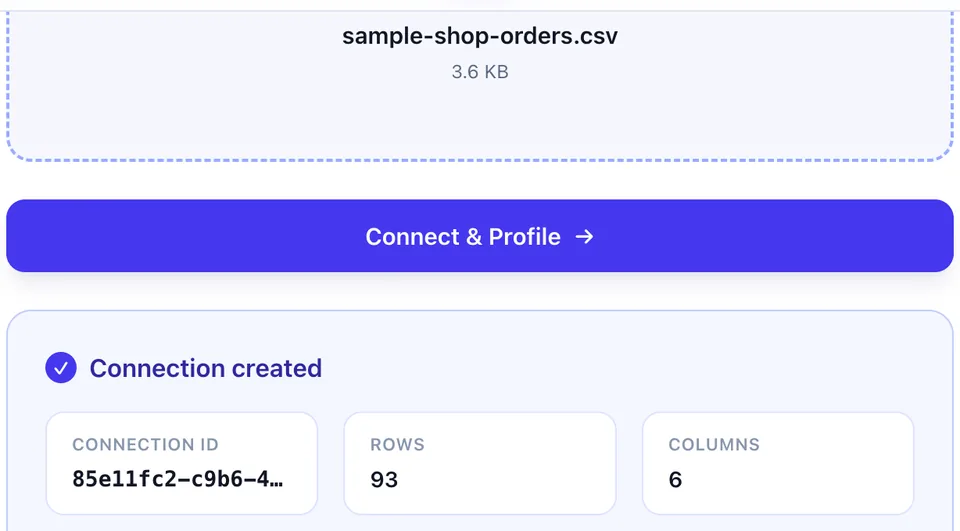
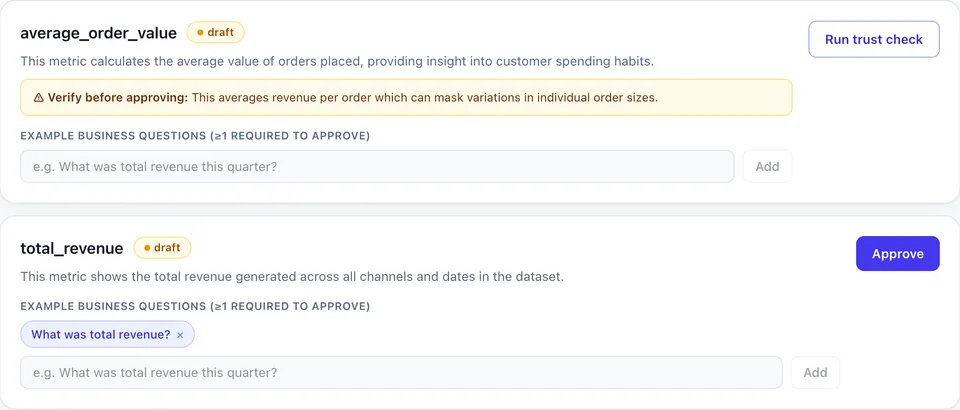
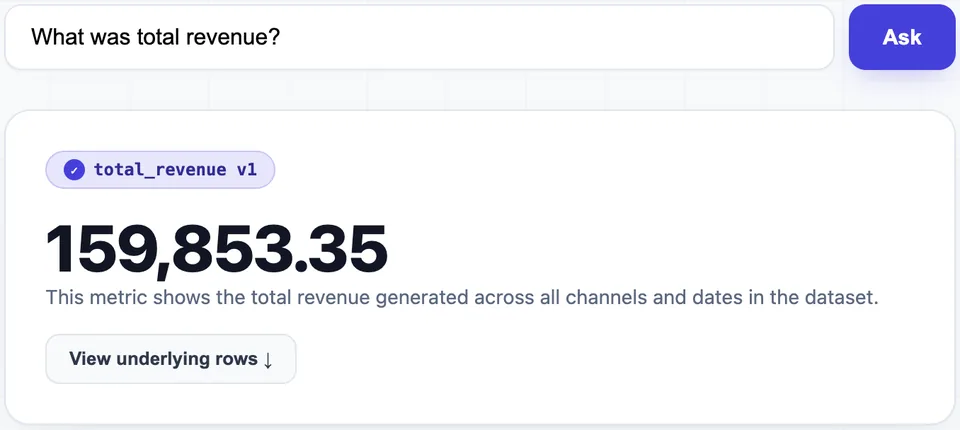
These are real Canon screens. The file is a made-up shop export, so the numbers are sample data.
1
Load a file
Upload a CSV export from any tool, up to 50 MB. Canon reads the columns and counts the rows. Your rows stay in your workspace.
Sample data
2
Approve the drafted metrics
AI drafts a plain definition for each metric it finds. Risky formulas carry a warning. You run a trust check and approve only the ones you agree with.
Sample data
3
Ask a question
Ask in plain English. The answer names the approved metric and version it used, and you can open the rows behind it. Share the page with a link.
Sample data
One question, start to finish
What an answer carries with it.
Real output from Canon on the sample shop export above (93 rows, made-up numbers).
Answered
“What was total revenue?”
159,853.35
Definition
total_revenue v1: SUM("Revenue"), the total revenue across all channels and dates
Approved
In the ledger, after a trust check, before anyone could ask
What was total revenue? · total_revenue · kpi · time stamp
Refused, on purpose
“What was our churn rate last month?”
No approved definition covers that question, so Canon will not guess a number. The workspace owner can draft and approve one in Canon.
Why
The file has no churn column and no approved churn metric
Audit log
What was our churn rate last month? · no metric · no_match · time stamp
ILLUSTRATIVE DEMO
Same question, two very different answers
Pick a question. On the left is what three tools or an ungoverned AI give you today. On the right is what Canon gives you once a metric is approved. Made-up numbers.
What you get today
Three tools, three answers, no source of truth
TODAY
What Canon gives you
One approved metric, and the receipts
WITH CANON
Illustrative example. These figures are not live data, they show how Canon resolves a question once a metric is approved.
Try it yourself
Type a question. Canon answers from an approved metric, or says no approved definition exists yet. It never invents one.
What Canon is not
So you know what to expect.
Not a dashboard tool
You do not build charts or reports. You ask a question and get one number with its definition and source.
Not a chatbot that guesses
The AI only picks from metrics you approved. Canon computes the number from your file. No match means no number.
Not a live database connector, yet
Today Canon reads CSV files you upload. It does not connect to live databases or warehouses.
Who it is for
Built for people who have to explain a number.
Agencies
Send clients numbers you can back up.
Load a client's export, agree each definition with them once, and answer from it every time. Share an answer page with a link.
Small teams and founders
One number for revenue, not three.
When each tool counts revenue its own way, pick one definition, approve it, and everyone gets the same answer.
Whoever signs off on the numbers
Nothing answers until you approve it.
Editors draft, approvers publish. Every answer is logged with the metric it used and a time stamp.
CSV files you upload, up to 50 MB each. For example an export from Google Analytics, an ad platform, a CRM or a spreadsheet. Canon does not connect to live databases or warehouses yet.
Where is my data kept?
In your workspace on Canon's servers. The Canon app, its database and your uploaded files are hosted on Railway; the website is hosted on Vercel. Your data rows are not sent to an AI model. To draft metric definitions, Canon sends a profile of the columns (column names, types, null and distinct-value counts, and the report's date range, currency and time zone when present) to its AI provider (OpenAI or Anthropic). When you ask a question, the question and your approved metric definitions are sent so the model can pick the right metric. Canon then computes the number from your data itself.
How does setup work?
Upload a CSV, the wizard drafts metric definitions, an approver publishes one, then you ask a question. You don't write SQL or integration scripts.
Who controls which metrics get approved?
You do. The ledger is role-gated: editors draft, approvers publish. Canon enforces the boundary in code, so no one bypasses the approval step. You decide who holds the approver role.
What happens when underlying data changes?
An approved metric can have a golden query that records the expected result. When the check is re-run and the result no longer matches within tolerance, Canon marks it failed, so you see the drift before you rely on the number.
What does it cost?
Canon is free during the beta. No credit card.
How do I get help?
Use the contact form at the bottom of this page. Leave your email and we will reply.